In an age where professional photo editing required complex software and technical expertise, I set out to create something simple and accessible: an app that lets you talk to your photos and watch them transform. PhotoPerfectAI harnesses the power of Google's Gemini API to make professional-grade photo editing accessible to everyone. No account required, no steep learning curve, just natural language commands that bring your vision to life.
Why I Built This App
Traditional photo editing tools have always frustrated me. Whether it was adjusting lighting, removing unwanted objects, or creating professional portraits, the process was either too complex for casual users or required expensive subscriptions or complex software. I kept encountering the same pain points:
- Needing professional-quality edits without learning complex software
- Wanting to transform casual selfies into LinkedIn-worthy portraits
- Requiring quick object removal or background changes
- Desiring an intuitive, natural way to communicate editing intentions
Most photo editing apps were either too limited, required expensive subscriptions, or buried powerful features under confusing interfaces. I wanted to create something that was both powerful and delightfully simple, where you could just describe what you want in plain language, and the AI would make it happen. That's how PhotoPerfectAI was born.
Core Features
Talk to Your Photos
Simply describe what you want in natural language. Our AI understands commands like "make it sunset," "add a cat," or "change the background" and executes your vision instantly. No complex interfaces, no learning curve, just describe and transform.
Professional Results
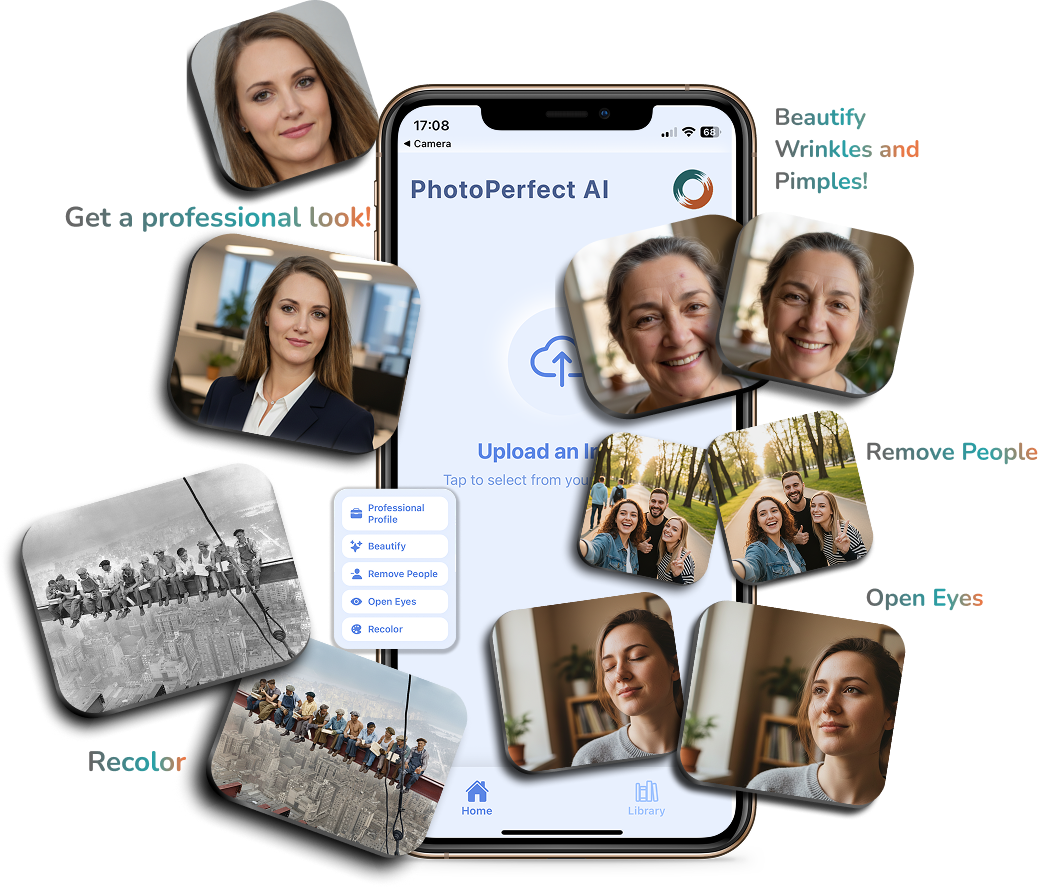
Transform a simple selfie into a LinkedIn-worthy professional photo. Perfect lighting, background, and attire adjustments, all powered by AI. Create stunning professional portraits from a single selfie with just a few taps.
Remove Unwanted Objects
Erase people, objects, or anything you don't want in your photos with a simple command. Whether it's a photobomber, an unsightly object, or unwanted background elements, PhotoPerfectAI removes them seamlessly.
Open Eyes & Beautify
Fix closed eyes, remove blemishes, and enhance your natural beauty with AI-powered retouching. The app intelligently opens closed eyes in photos and provides professional-grade facial enhancement.
Recolor Old Photos
Bring vintage black and white photos to life with stunning, realistic colorization. Transform historical family photos into vibrant, colorful memories with AI-powered color restoration.
Multi-Language Support
Use PhotoPerfectAI in your preferred language. No account required, just start editing. The app supports multiple languages, making professional photo editing accessible to users worldwide.
Technical Implementation
Natural Language Processing for Photo Editing
The core innovation of PhotoPerfectAI lies in its natural language processing capabilities. Users can describe their editing intentions in plain English (or other supported languages), and the app's AI interprets these commands to perform complex photo manipulations. This required integrating advanced language models that understand context, intent, and visual editing terminology. The system processes commands like "make it sunset" by understanding both the semantic meaning and the visual transformation required.
Gemini API Integration
PhotoPerfectAI leverages Google's Gemini API to power its photo editing capabilities. The app provides a simple, intuitive interface that connects users to powerful AI image generation and manipulation features. By integrating Gemini's API, the app can handle complex photo editing tasks like background changes, object removal, and style transformations. The API handles the heavy lifting of AI processing, allowing the app to focus on delivering a clean, user-friendly experience.
Simple Interface for Complex Edits
PhotoPerfectAI provides a simple interface that connects users to Gemini's powerful image generation and manipulation capabilities. Whether it's changing backgrounds, adding objects, or transforming lighting conditions, the app leverages Gemini's API to handle these complex editing tasks. The API's advanced models ensure that edits look natural and professional, making sophisticated photo editing accessible through simple natural language commands.
Facial Retouching Features
The app's facial retouching capabilities leverage Gemini's API to handle tasks like opening closed eyes, removing blemishes, and enhancing portraits. Users can simply describe what they want, "open my eyes" or "remove blemishes", and the API handles the complex image processing to deliver natural-looking results that maintain the original photo's style and appearance.
Simple One-Time Purchase Model
PhotoPerfectAI uses a straightforward one-time purchase model. When you buy the app, you own it forever with full access to all features. No subscriptions, no in-app purchases, no accounts required. This simple approach means you pay once and can use the app as much as you want, whenever you want, without any ongoing costs or limitations.
UI/UX Design
Intuitive Interface Design
The app's interface was designed with simplicity and clarity in mind. The main screen features a clean, modern design that guides users through the editing process without overwhelming them with options. The natural language input is prominently displayed, making it clear that users can simply describe what they want. Visual feedback during processing keeps users informed, while the results are displayed in a way that makes it easy to compare before and after versions.
Seamless User Experience
Every interaction in PhotoPerfectAI is designed to feel natural and responsive. From selecting photos to entering editing commands, the workflow is streamlined to minimize friction. The app provides helpful suggestions and examples to guide users who might be unsure how to phrase their editing requests. This attention to user experience makes professional photo editing accessible to users of all technical skill levels.
Challenges and Solutions
API Integration and User Experience
Integrating Gemini's API while maintaining a smooth user experience presented several challenges. The app needed to handle API calls efficiently and provide clear feedback during processing:
- Implemented efficient API request handling and error management
- Added clear loading states and progress indicators during processing
- Optimized image upload and download processes for faster response times
- Designed intuitive error messages and retry mechanisms for failed requests
Maintaining Photo Realism
One of the biggest challenges was ensuring that AI-generated edits looked natural and realistic. Over-processed or artificial-looking results would undermine user trust. This required careful model selection, extensive testing, and fine-tuning to ensure that edits enhance photos rather than making them look obviously manipulated. The app uses advanced techniques to preserve photo authenticity while applying requested transformations.
App Store Approval and AI Guidelines
Navigating App Store approval for an AI-powered app required careful attention to Apple's guidelines regarding AI features, user privacy, and content generation. The app needed to clearly disclose its AI capabilities, ensure user data privacy, and comply with content policies. Additionally, the app's ranking as #2 in Productivity on the App Store demonstrates its success in meeting both user needs and platform requirements.
Conclusion
Building PhotoPerfectAI has been an incredible journey into the intersection of artificial intelligence and user experience design. The app represents a simple approach to photo editing, one where natural language replaces complex interfaces, and AI makes professional-quality editing accessible to everyone.
The success of PhotoPerfectAI, including its #2 ranking in Productivity on the App Store, validates the approach of combining powerful AI technology with intuitive design. By leveraging Gemini's API through a simple interface, the app makes professional-quality photo editing accessible to everyone. The natural language interface removes barriers that have traditionally prevented casual users from achieving professional-quality photo edits.
I hope this behind-the-scenes look at PhotoPerfectAI's development provides insight for other developers exploring AI-powered applications. If you're interested in trying PhotoPerfectAI yourself, it's available now on the App Store for iOS 15.0 or later. Simply download, start talking to your photos, and watch them transform.